A private personal ledger for everyday life: record expense, income and transfers with a calculator keypad, plan budgets, track bills and assets — and keep credit cards in view. No sign-up, and your data stays on your device by default; sync across iPhone, iPad and Mac with iCloud when you want to.
From the first entry to year-end overview — precise, private, and pleasant to use.
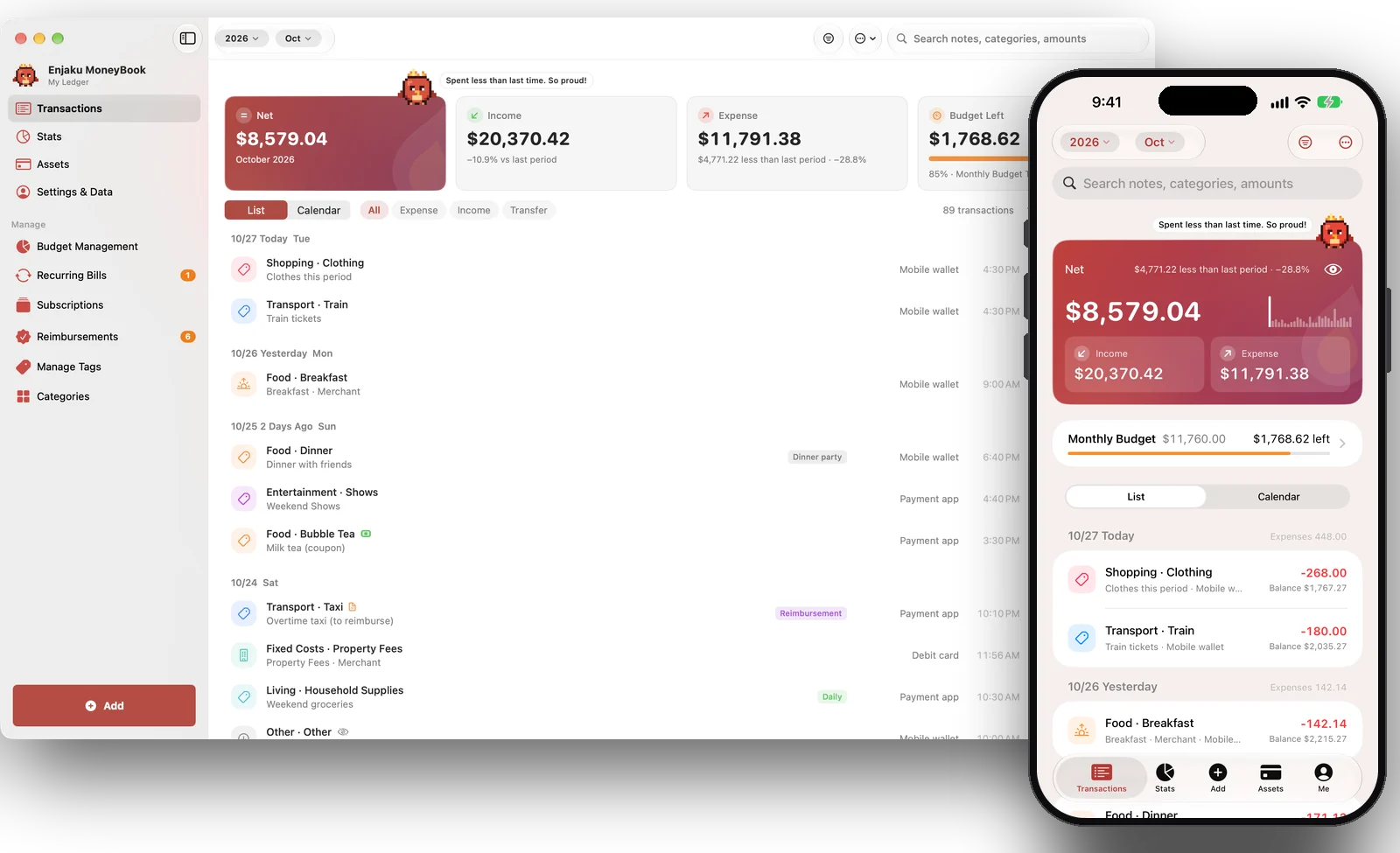
Type expressions like 128×3 right in the amount field. Expense, income or transfer — with categories, tags, notes and date. Duplicate-entry hints and smart category suggestions keep logging fast.
Billing periods that match your payday, list ⇄ calendar heatmap, multi-filter search. Swift Charts show category shares, daily and monthly trends, weekday spread, top spenders and a yearly overview.
Monthly and per-category budgets with critical / overspend alerts, period-over-period comparison, end-of-month forecast and savings rate — so surprises arrive before the bill does.
Net worth, total assets and liabilities at a glance. Group and archive accounts, calibrate balances, and manage credit limits, statement dates, due amounts and pre-filled repayments.
Periodic bills post themselves on schedule. Mark expenses for reimbursement and settle them in batches, split coupons from list price, refund partially or repeatedly, and flag entries out of income or budget.
No sign-up and no analytics; data stays on your device by default, with iCloud sync when you want it. Face ID / Touch ID lock with a privacy shield in the app switcher, Shortcuts & Siri, local notifications, and JSON / CSV export — on iPhone, iPad and Mac.
Every entry stays on your device by default. There is no account system and no analytics. When you want your books on more than one device, turn on iCloud sync — the data travels through your own iCloud and never touches our servers. Lock the app with Face ID, hide amounts when you need privacy, and export JSON or CSV whenever you want a full copy.
Answers to common questions about Enjaku MoneyBook.
No. Enjaku MoneyBook has no accounts and no passwords. Open it, create your first account, and start logging.
On your device by default. Enjaku MoneyBook never uploads your ledgers to our servers and includes no analytics. If you turn on iCloud sync (Pro), your ledgers sync between your devices through your own iCloud.
You can export JSON or CSV at any time; import restores from JSON and automatically backs up first.
iPhone and iPad on iOS 17 or later, and Mac on macOS 14 or later with a native Mac app. Home-screen widgets and Shortcuts / Siri are supported too.
Yes. The amount field accepts + − × ÷ expressions. While computing, Save turns into “=”, and common amounts, recent categories and note-based suggestions speed up the next entry.
Set monthly and per-category budgets with critical / overspend alerts. Credit cards track limits, statement and due dates, current and previous bills, and pre-fill repayments for you.
Yes. Home-screen widgets (Pro) show this month's totals and upcoming subscription charges, and Shortcuts / Siri can log an expense or income and read a monthly summary. Face ID / Touch ID locks the app and shields content in the switcher.
Yes — full logging, statistics, budgets and export are all free. MoneyBook Pro, available as an App Store subscription (1 month / 6 months / 1 year) or a one-time purchase, adds iCloud sync across devices, unlimited ledgers, unlimited subscriptions and recurring bills, unlimited tags and tag groups, reimbursement management and widgets. The one-time purchase works on iPhone, iPad and Mac with the same Apple Account.
Questions, ideas — or something you'd like to build with us.
Found a bug or have a feature request? We usually reply fast.
support@suzatei.comPartnerships, distribution and investment inquiries are welcome.
contact@suzatei.com